
Last reviewed: 25 October 2026
For a Japan holiday, the easiest choice is usually a Suica in Apple Wallet if you have a compatible iPhone, or a physical IC card if you prefer something separate from your phone. Arriving in Osaka? ICOCA is a practical alternative.
If you are still planning your airport journey, see our guides from Haneda Airport to Tokyo and Narita Airport to Tokyo.
The names can be confusing. An ordinary Suica in Apple Wallet, Welcome Suica Mobile and a physical Welcome Suica are different products, with different expiry and refund rules. Choose the one that suits your trip before loading money.
Which card should you choose?
| Option | Where to get it | Best suited to | Important difference |
|---|---|---|---|
| Ordinary Suica in Apple Wallet | Wallet on a compatible Apple device | Travellers comfortable paying by phone | Different from the Welcome Suica Mobile visitor app |
| Welcome Suica Mobile | JR East’s visitor app for supported Apple devices | Visitors aged 13 and over | Valid for 180 days from issue; unused balance is not refundable |
| Physical Welcome Suica | Selected airport and city sales points | Short visits and travellers without a compatible phone | Valid for 28 days including purchase day; no deposit or balance refund |
| Regular physical Suica | Participating JR East station sales points | Travellers who want a reusable physical card | ¥500 deposit; issuer-specific refund process |
| Physical ICOCA | Participating JR West machines and ticket offices | Arrivals in Kansai | No need to buy a Suica as well for ordinary journeys on participating networks |
Our suggestion: choose by your phone and arrival airport, rather than collecting different cards for every city. Keep some Japanese yen available as a backup.
Add an ordinary Suica to Apple Wallet
On a compatible iPhone:
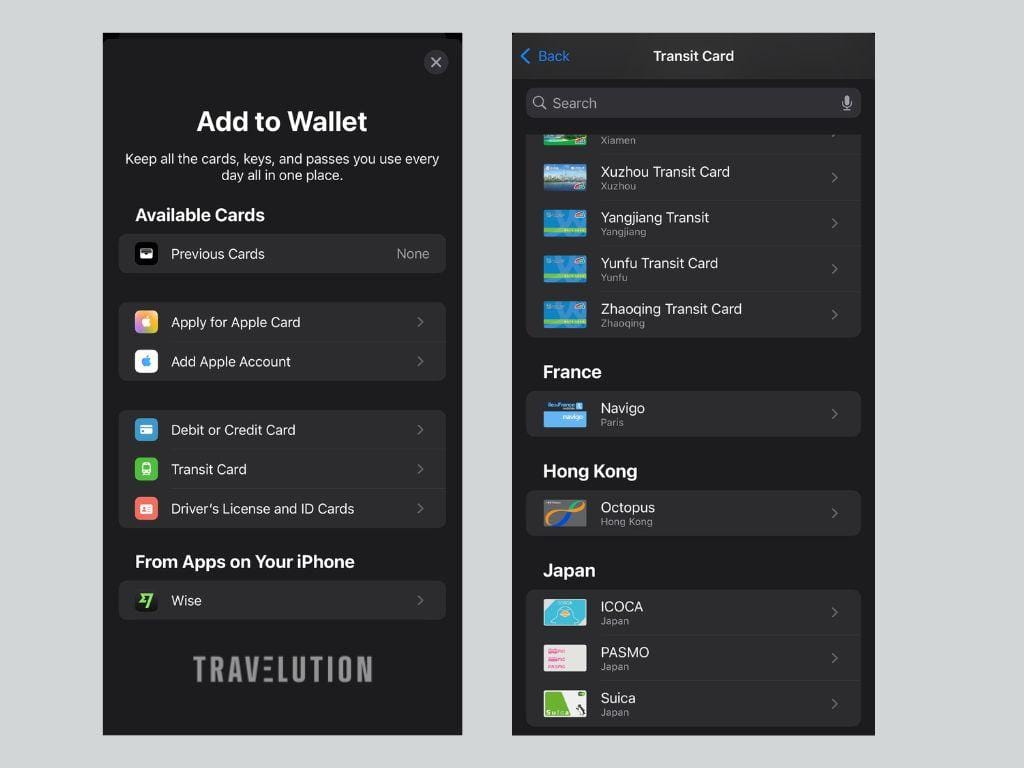
- Open Wallet and tap +.
- Choose Travel Card or Transit Card, then Suica.
- Select Add New Card if shown.
- Choose your starting balance and complete the payment using an eligible card in Apple Wallet.
For most Malaysian travellers, an iPhone 8 or later with supported, up-to-date iOS is the straightforward starting point. You also need an Apple Account signed in with two-factor authentication and an eligible payment card. Apple lists some older Japan-purchased devices separately.
You do not need to change your iPhone’s region to Japan as a standard setup step. Apple’s Malaysian instructions do not require it. Express Mode lets you tap without opening Wallet. See Apple’s setup guide for device requirements and the current steps.
Do not assume every Malaysian-issued bank card will complete a top-up. Test a modest amount rather than relying on a particular bank or travel-money card to work. If payment fails, check with the card issuer and keep a physical-card-and-cash fallback for arrival.
Welcome Suica Mobile is a separate option
Welcome Suica Mobile is JR East’s visitor-focused app, not simply another name for adding an ordinary Suica through Wallet.
Download the app, follow its setup instructions and allow the requested location access. Depending on your location, legal restrictions may prevent issuance or top-ups until you arrive in Japan. Check the app’s current device and software requirements before travelling.
The app is for users aged 13 and over. Its Suica lasts 180 days from the date of issue, not from your first train journey. Any remaining balance expires and is not refundable. Avoid issuing it months before you need it or loading more than you expect to spend.
Buy a physical Welcome Suica
Prefer a card in your wallet? Physical Welcome Suica is a convenient short-stay choice. It lasts 28 days, counting the purchase date, and has no deposit. It is not the same product as the 180-day mobile version.
Sales points include:
- Narita Airport Terminal 1 and Terminal 2·3 stations.
- Haneda Airport Terminal 3’s Tokyo Monorail station.
- Selected city locations, including JR East Travel Service Centres at Tokyo, Shinjuku, Shibuya, Ikebukuro and Ueno.
It is therefore not restricted to airport purchase. Check JR East’s current sales locations and opening hours before making a special trip.
Listed purchase amounts range from ¥1,000 to ¥10,000, with several denominations available. Keep the reference paper supplied with your card, which records its validity. Unused balance is not refundable, so top up gradually and spend it before expiry. See the physical Welcome Suica overview.
Buy a regular physical Suica
Regular physical Suica is another option at participating JR East stations. You do not have to register your name to buy every Suica: non-personalised Suica and PASMO sales resumed on 1 March 2025. Ask for a non-personalised card if that is what you want; personalised cards are a separate choice.
The purchase price includes a ¥500 deposit. For example, paying ¥2,000 leaves ¥1,500 to spend. A regular card becomes invalid after ten years without use. Check the official Suica guide for current terms.
Flying into Osaka? Consider ICOCA
You can buy a physical ICOCA from participating JR West ticket machines or offices, including at Kansai-airport Station. Look for the ICOCA mark and switch the machine to English. A ¥2,000 purchase includes a ¥500 deposit and ¥1,500 usable balance. Bring cash for the purchase.
ICOCA works on participating networks beyond Kansai, including many routes in Tokyo. If you already have a suitable Suica, you generally do not need an ICOCA just because you are visiting Osaka. See JR West’s purchase guide.
Top-ups and everyday use
For physical Suica and Welcome Suica, use cash at compatible station top-up machines. The maximum stored balance is ¥20,000. Digital top-ups use the supported payment method for your chosen service.
At railway gates, tap the same card or device when entering and leaving. If a gate rejects it, step aside and ask staff rather than switching cards halfway through the journey. On buses, follow the operator’s instructions: boarding, exit and payment arrangements vary.
At participating shops, tell the cashier you want to pay by IC card and check the amount before tapping. Look for the acceptance logo rather than assuming every shop or vending machine takes it. JR West’s shopping guide explains payments and cash top-ups at participating stores.
An IC card is prepaid money, not an unlimited rail pass. Separate tickets or reservations may be required for limited express trains and the Shinkansen. Nationwide interoperability does not mean every route is covered, or that you can make one continuous tap-in journey between separate IC areas. Check unusual or long-distance journeys before boarding. See the Welcome Suica coverage rules before planning intercity travel.
Travelling with children or a group
Plan a separate card or ticket for each fare-paying traveller. Do not expect to pass a single phone back through a railway gate for the whole family. JR East’s mobile Suica FAQ specifies one traveller per device.
For a child’s physical Welcome Suica, bring the child’s passport or other accepted identification. A family member can purchase it with the child’s ID. JR East’s child-card rules include validity through 31 March following the child’s 12th birthday; ask staff to confirm the correct product for your child’s age and travel dates. The purchase page has the details.
Using Suica in Hokkaido and on a ski holiday
Suica and ICOCA work on the airport train between New Chitose Airport, Sapporo and Otaru. For non-reserved seats, you can use your IC card at the gates; a reserved seat needs its additional reservation. See JR Hokkaido’s airport train guide.
Otaru is not Kiroro resort. Plan the onward road transfer separately. Do not assume your Suica covers a resort shuttle or private transfer.
For Tomamu, Niseko, Furano and other stations outside the applicable IC area, buy the necessary train tickets before boarding. JR Hokkaido lists these exclusions in its Kitaca coverage guide. For the road leg, check your Club Med Japan arrival arrangements or compare Hokkaido private transfers.
What happens to leftover money?
- Regular physical Suica: return it to the appropriate issuer. JR East-issued cards are refunded at JR East stations, not any JR company nationwide. A fee of up to ¥220 is deducted from the remaining balance; the ¥500 deposit is returned. Other issuers have their own procedures. See Suica refund terms.
- Ordinary Suica in Apple Wallet: refunds are possible, but require Suica app membership and a Japanese domestic bank account. Deleting the card from Wallet does not refund it. For most short-term visitors, spending down the balance is simpler. See JR East’s digital refund rules.
- Welcome Suica, physical or mobile: unused balance is not refundable.
- ICOCA: use the issuing operator’s refund process. Do not assume a Tokyo counter can refund a JR West card.
Before flying home, check your remaining balance and avoid a large last-minute top-up. A small balance is easier to use on everyday purchases than to recover after leaving Japan.