

Planning a Club Med getaway is incredibly exciting, and having total peace of mind about your trip makes it even better.
When you book through Travelution Holidays, we make sure you’re covered from day one. As soon as your reservation is locked in, we’ll send you everything you need to easily verify your Club Med booking.
This quick guide will walk you through exactly how to use your Club Med file number to check your booking details, confirm your itinerary, and get ready to unwind.
Step 1: Locate Your Club Med Booking Confirmation
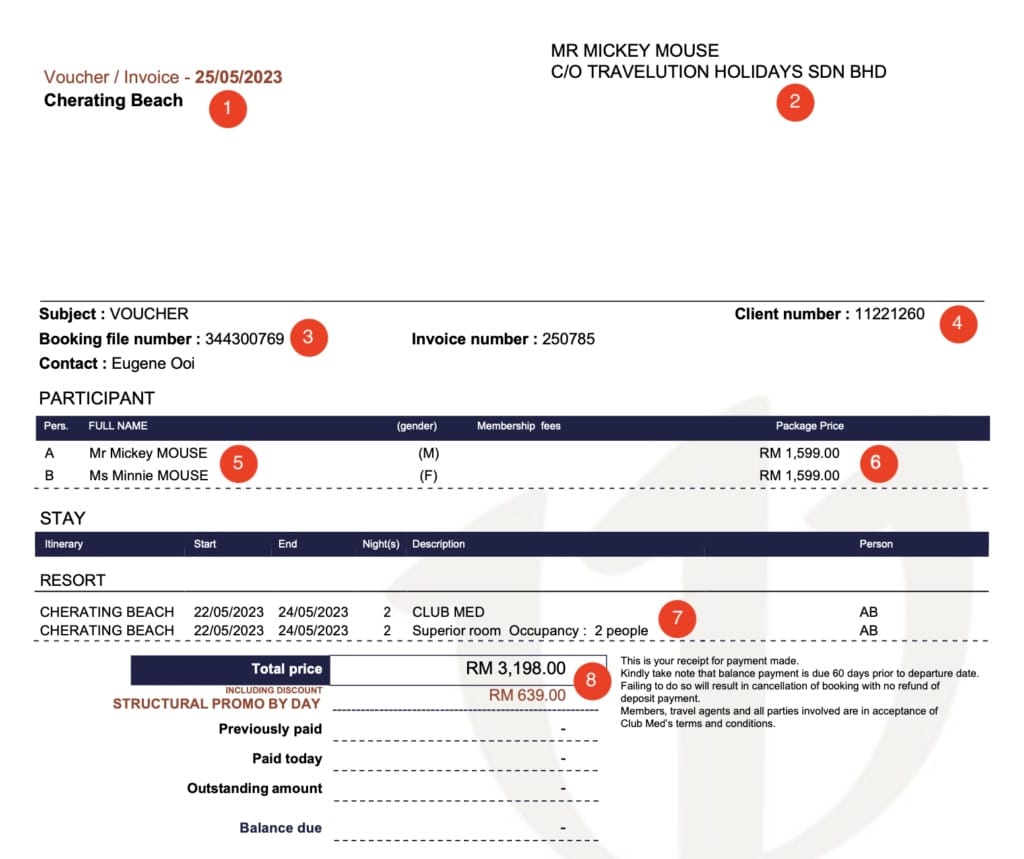
After confirming your trip with Travelution Holidays, you’ll receive a Club Med confirmation PDF. This document holds all the essential information about your booking, including your unique booking file number, which is the key to retrieving your booking online or via the Club Med app.
Here’s what to look for:
| Number | What You Will See |
|---|---|
| 1 | Your Club Med Resort Location |
| 2 | Your Name (with Travelution Holidays listed as your agent) |
| 3 | Your Club Med Booking File Number |
| 4 | Your Club Med Client Number (also your Club Med Great Members ID) |
| 5 | Names of everyone in your booking (Last name: IN UPPERCASE) |
| 6 | Per-Person Package Price |
| 7 | Your room type selection. Example, “Superior Room, Occupancy: 2 people” |
| 8 | The Total Package Price |
💡 Note: If you see a line item such as “Structural promo by day”, this refers to a promotional discount applied to the standard Club Med rate. It is included for reference only, and has already been factored into your total package price.
Step 2: Retrieve Your Club Med Booking Online or via App
You can check your booking through the official Club Med website or on the Club Med mobile app.
Open your preferred browser and navigate to clubmed.com.my or launch the Club Med app (Apple App Store or Google Play) on your smartphone.
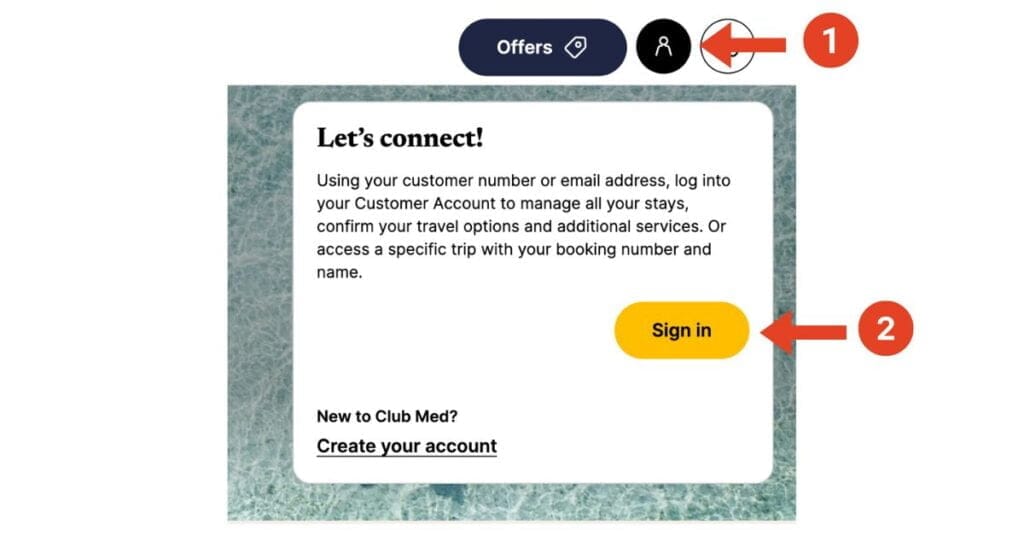
For web browser, click on the person icon on the top right corner on the homepage, and click “Sign In“
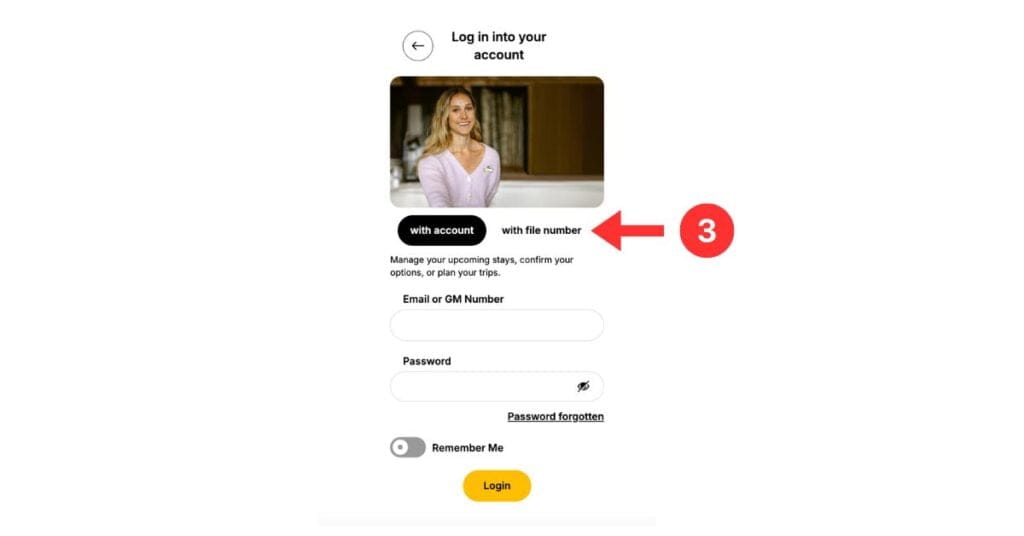
Click on “with file number” at “Access Your Trip with Your File Number.
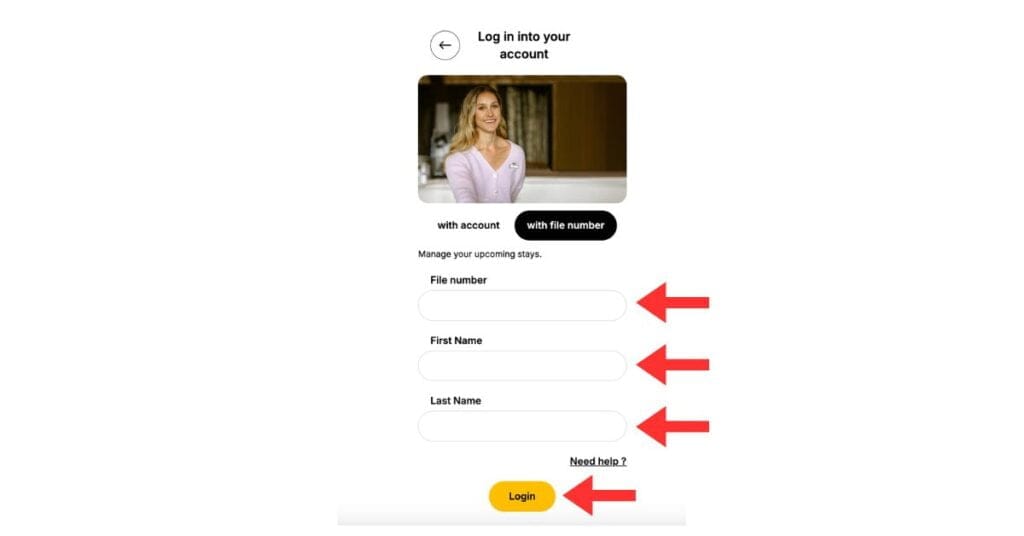
Please input your File Number, along with your First and Last Name as prompted, and then click “Log In“.
Step 3: Verify Your Club Med Booking Summary
Once you’re in, you’ll see a snapshot of your Club Med holiday.
| Number | What You Will See |
|---|---|
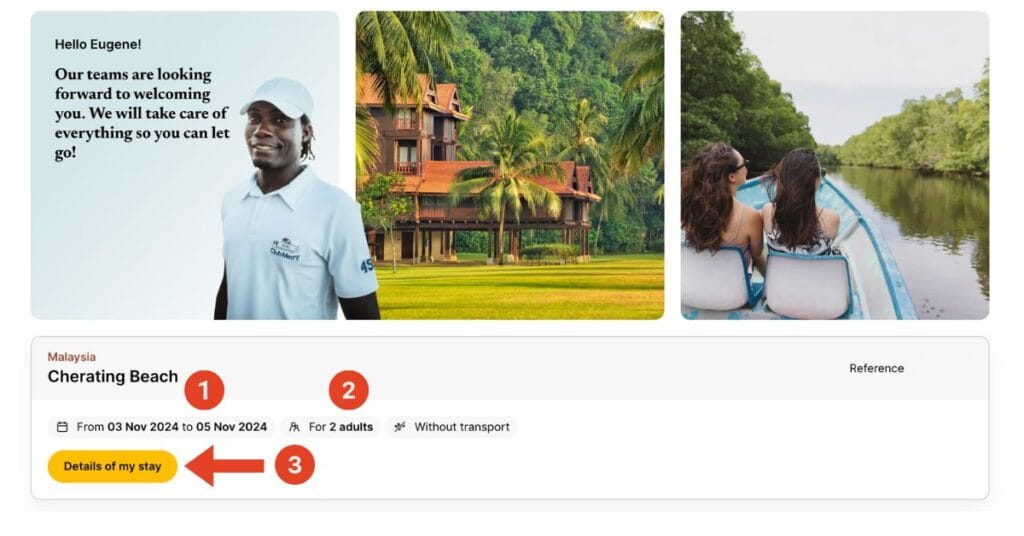
| 1 | Summary of your trip: travel dates, number of guests |
| 2 | “Transport” refers only to flights or ferry tickets (Club Med airport transfers are not indicated here) |
| 3 | Click “Details of My Stay” to see more |
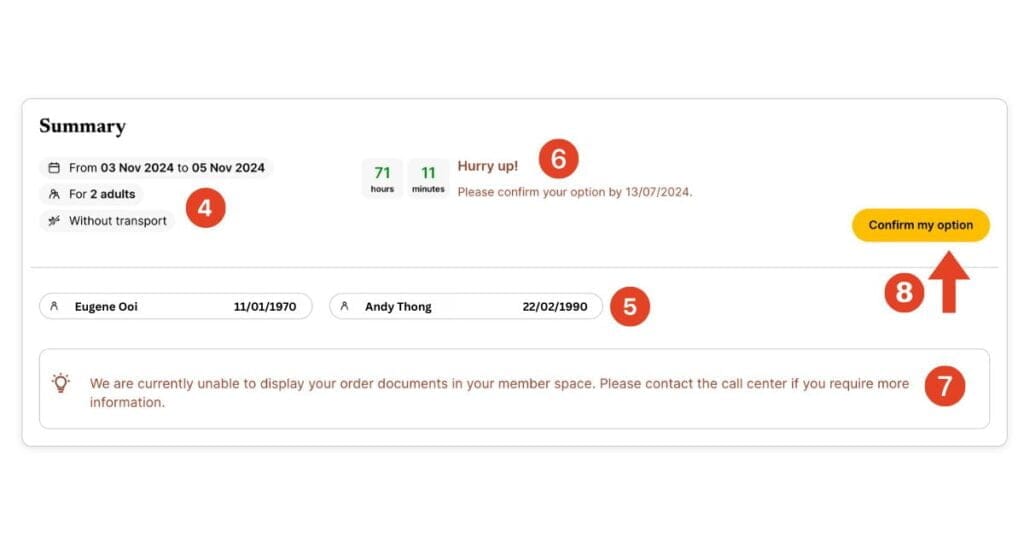
Under “Details of My Stay”, you’ll find:
| Number | What You Will See |
|---|---|
| 4 | Your full booking details again, including transport booked |
| 5 | Full names and dates of birth of all travellers |
| 6 | How much time you have left to confirm your booking |
| 7 | Access to your Club Med confirmation documents (available after payment and validation) |
| 8 | “Confirm My Option” button. Once clicked, you’ll see a prompt asking you to contact Travelution Holidays to finalise your booking |
⚠️ Reminder: Since your booking was made through Travelution Holidays, you won’t be able to confirm or pay online. You’ll be prompted to contact us to complete payment and lock in your stay.
Step 4: What Happens After Payment?
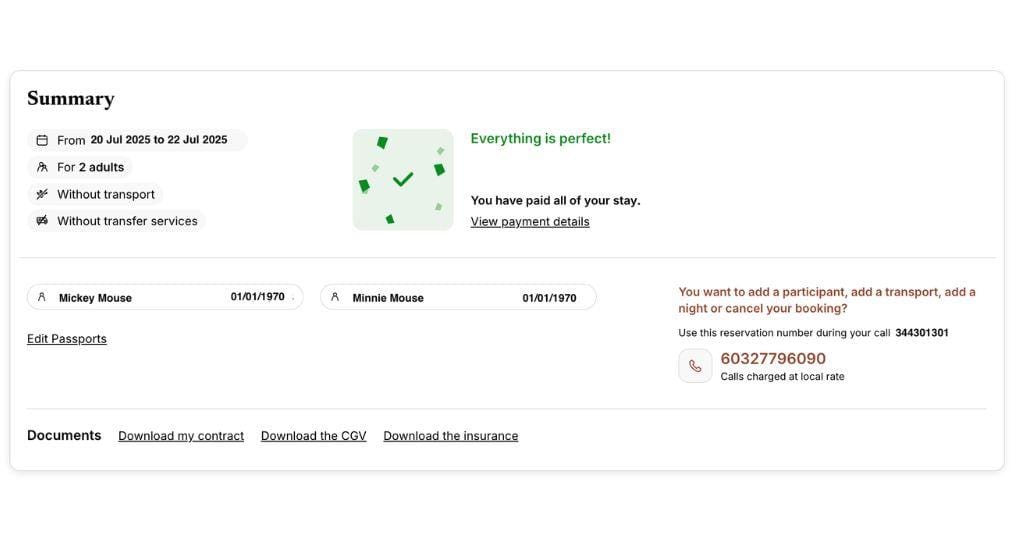
Once your payment is received and your booking is validated by Club Med, you’ll be able to:
- Download your official confirmation documents
- See all details reflected correctly in your Club Med account
Step 5: Verifying Flight Bookings
If you booked a Club Med flight package, here’s how it works:
- Payment is required within 24 hours
- Your tickets will be issued upon receipt of passport copy and payment
You can verify your flight booking directly with the airline:
- Visit the airline’s website
- Look for “Manage Booking” or “My Trips”
- Enter your booking reference and name
- Double-check that everything matches what Travelution Holidays sent you.
Step 6: Airport Transfers & Arrival Info
Depending on what you’ve booked, here’s what to expect:
- Club Med Flight Packages: Airport transfers are included
- Club Med Bintan Ferry Package: Jetty-to-resort transfers are included too
- Room + Transfer Packages: Your transfer section unlocks after payment is completed and your booking is validated
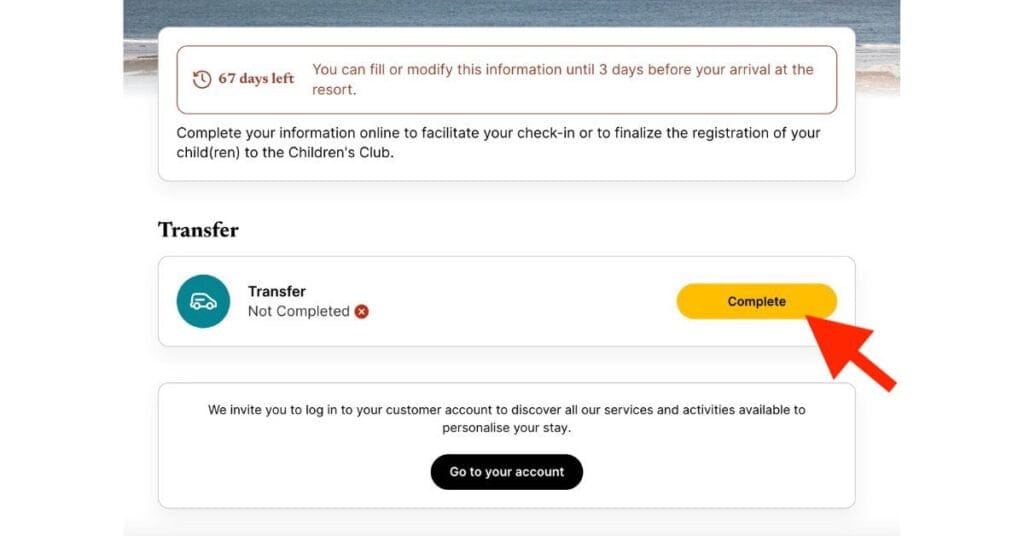
To submit your arrival details, follow the same login steps above and:
- Go to Details of My Stay
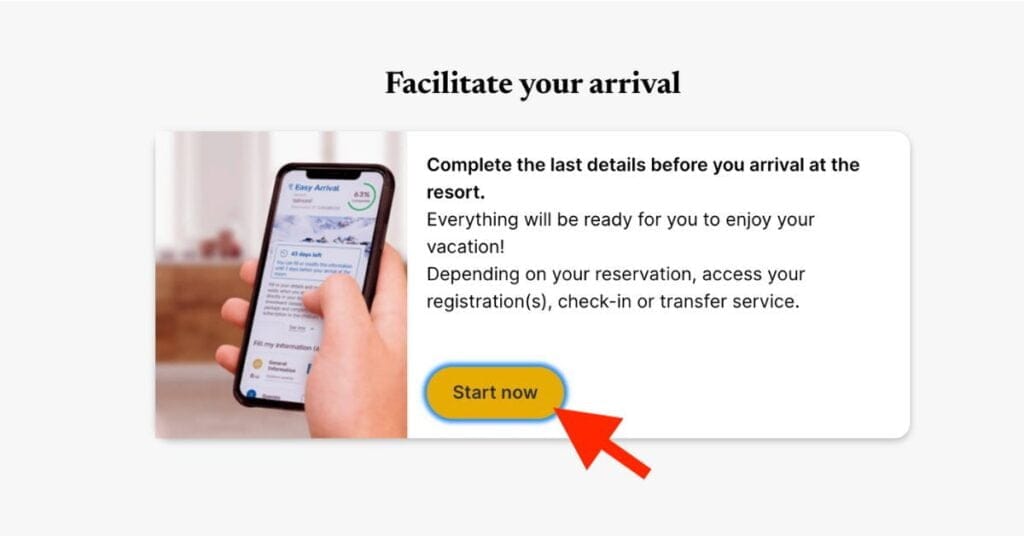
- Scroll to Facilitate Your Arrival
- Click Start Now
- Under Transfer, click Complete to submit your flight details
Don’t feel like doing it yourself? Just message us. We’re happy to do it for you.
Frequent Asked Questions – Quick Answers
Can I verify my booking using the Club Med app?
Yes! It works the same as the website. Just use your file number and name to log in.
Where can I find my Club Med booking file number?
Check your PDF confirmation from Travelution Holidays. The file number is listed in the centre of the page.
What if I see a mistake in my booking?
Let us know right away. Mistakes are rare, but it’s always best to double-check and correct them early.
Is Travelution Holidays an official Club Med partner?
Absolutely. We’re one of Club Med’s leading travel partners in Malaysia and a fully licensed travel agency registered under the Ministry of Tourism in Malaysia. Our license number is 10483.
What if there’s an issue with my flight booking?
Reach out to us immediately. We will resolve it as quickly as possible.
Verify Your Club Med Booking and Travel With Confidence
Your holiday should start the moment you book. By taking a few minutes to verify your Club Med booking with the steps above, you’re setting yourself up for a smooth, stress-free getaway.
If you’re feeling unsure or just want a helping hand, the team at Travelution Holidays is here for you, before you go, while you’re there, and even after you return.
Ready to start your Club Med adventure? Drop us a message, and we’ll take care of the details so you can focus on enjoying every moment.